


A novel's page
Tapping a novel anywhere in the app opens its page.
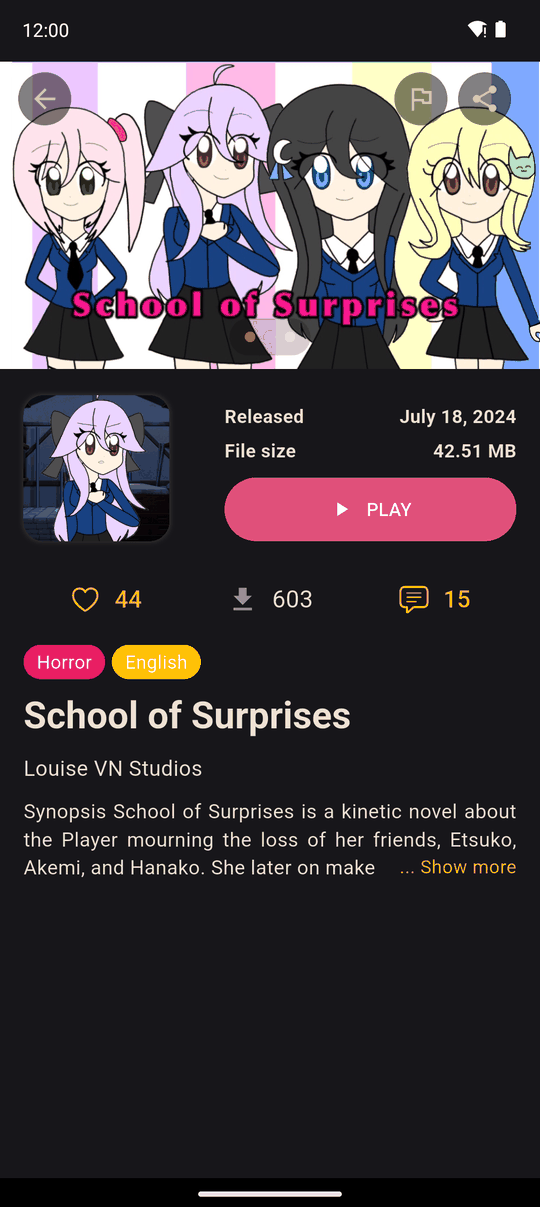
What you see
- Cover and banners at the top.
- Tags: genres and languages.
- Title and creator, with a link to the creator's social profile if they have added one.
- Released date and File size.
- Synopsis in your language. Tap Show more to read all of it.
- More from this creator: other novels by the same person.
Buttons
| Button | What it does |
|---|---|
| DOWNLOAD | Downloads the novel to your device, needs an internet connection. It changes to Play once it is in your Library. |
| Play | Starts the novel. |
| Heart | Likes the novel. The number is how many people liked it. Needs an account. |
| Download counter | How many times the novel has been downloaded. |
| Comment bubble | Opens the comments. See Comments, follows and reports. |
| Bell (Follow / Unfollow) | Follow the creator to get a notification when they publish a new novel. Needs an account. |
| Flag | Report the novel if it breaks the community guidelines. You can add an optional reason. |
| Share | Opens your phone's share sheet with a link to the novel. See Links. |
Downloading
A novel is a single file. It downloads to your device and is stored in your Library, so you can play it offline afterwards. Downloading needs an internet connection: without one you will see An internet connection is required to download this novel.
Last updated: