


Export as an app
Export turns your novel into its own app or web page, with your title and icon, that you can give to people or publish elsewhere. It needs Premium.
The formats
Open the novel's menu in the Workshop and tap Export. The formats are:
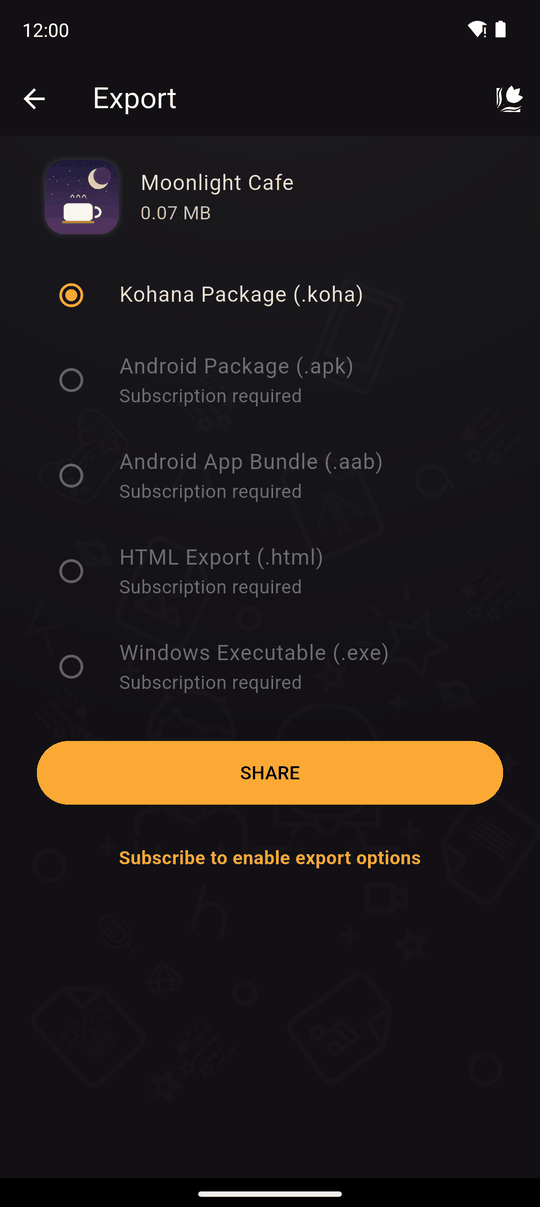
| Format | What you get | Use it for |
|---|---|---|
| Kohana Package (.koha) | A file for the Kohana app | Free. See Share a package |
| Android Package (.apk) | An installable Android app | Sending to Android users directly |
| Android App Bundle (.aab) | The format Google Play wants | Publishing on Google Play |
| HTML Export (.html) | A version that runs in a web browser | Putting the novel on a website |
| Windows Executable (.exe) | A Windows program | Distributing to Windows users |
Exported apps use your novel's title as the app name and its icon as the app icon, and play your novel the same way Kohana does.
Request an export
- Choose a format. Formats that you can't use yet say why: Subscription required, Export requests limit reached or Size larger than allowed (250MB / 500MB).
- For .apk, .aab and .exe, enter a Package name. For .apk and .aab, also a Version name (for example
1.0.0). - Tap EXPORT.
The build is made on Kohana's servers, so you need an internet connection. It usually takes 10 to 15 minutes, and you get an email when it finishes. Find it in Settings > Export requests. See Export requests.
Package name
The package name identifies your app, like com.yourname.mynovel.
- Letters, numbers and underscores, in parts separated by dots, each part starting with a letter.
- It can't start with
com.exampleorcom.android, or use reserved programming words. - Once you publish an app, keep its package name. Changing it makes a different app.
Version name
The version people see, such as 1.0.0. Change it when you publish an update.
Limits by plan
| Plan | Exports | Max size |
|---|---|---|
| Good Ending monthly | 5 a month | 250 MB |
| Good Ending yearly | 50 a year | 250 MB |
| True Ending monthly | 10 a month | 500 MB |
| True Ending yearly | 100 a year | 500 MB |
Every export request counts towards your limit, including ones that fail, and the count starts again from zero each time your subscription renews. See Premium.
Good to know
- Android: an APK from outside a store shows a security prompt on install, which is normal. A Google Play release needs your own Play Console account and the .aab.
- Windows: the program isn't code-signed, so Windows may warn before running it.
- HTML: upload the exported files to any web host.
- If an export Failed, see Export requests.
For what to actually do with each downloaded file, see Using your export.
Related
Using your export · Export requests · Premium · Share a package
Last updated: