


Text
The Text action shows a line in the text box: dialogue, narration, or context for the scene. It is the action you will use most.
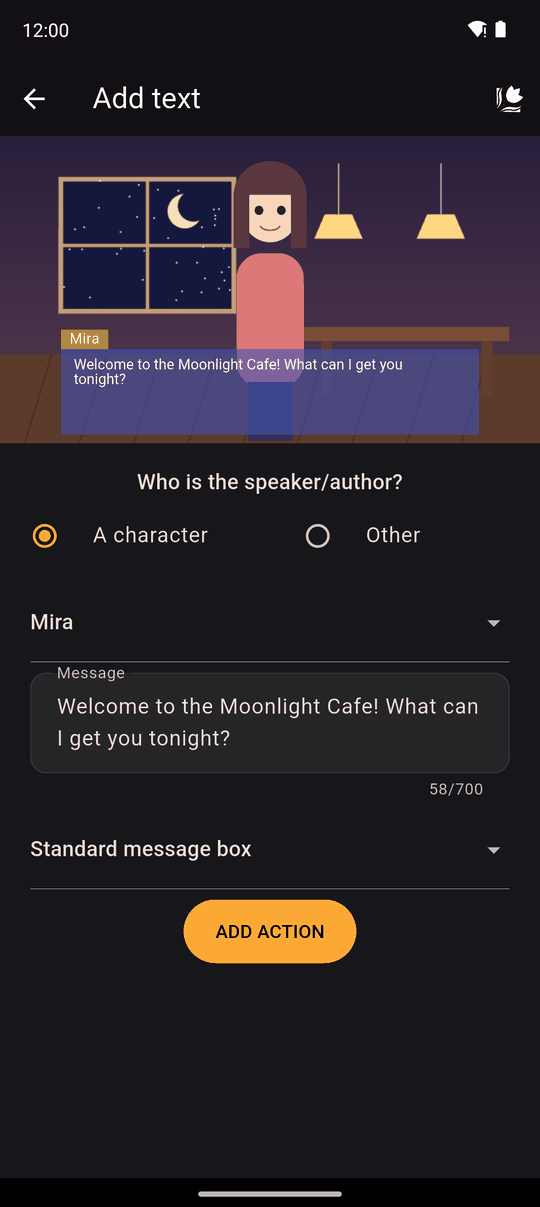
Settings
| Setting | Details |
|---|---|
| Who is the speaker/author? | A character (pick one you already have, or create one) or Other, where you type any name yourself, for example Narrator or ??? |
| Character name (when Other or new) | Up to 50 characters |
| Message | Up to 700 characters |
| Message box | Standard message box or Large message box |
Japanese counts characters differently: the limits are halved (25 and 350) because each character takes more room.
A speaker who is a character shows the name that character has in your Characters list. Choose Other for narration or for someone who never appears on screen.
In the player
The line appears in the text box with the speaker's name. The reader taps to advance, or uses Auto and Skip. The Player Log keeps the lines they have read.
Use the Large message box when a line needs more room, such as a letter or a long description.
Tips
- Show a variable's value with text variables: write
[gold]or{gold}in the message or the speaker name. - Changing the background with a transition hides the text box, so add your next Text action after a Scenery action rather than expecting the last line to stay.
- Keep lines short. Short lines read well on a phone and are easier to translate.
Related
Characters · Text variables · Translations
Last updated: