


Backup
A backup is a complete, editable copy of your novel saved as a .kohab file. Use it to protect your work, move to a new phone, or keep a version to return to.
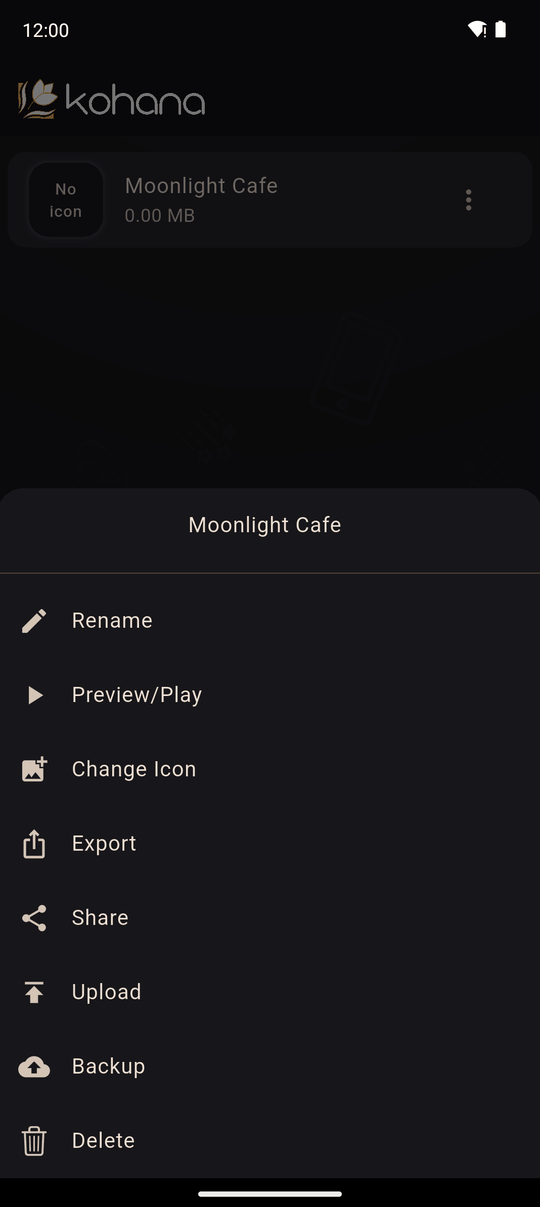
Make a backup
- Open the Workshop tab.
- Open the menu on your novel and choose Backup.
- Wait while Kohana packages your novel. A progress window shows the steps.
- On Android, a save file screen opens so you can pick where to keep it, such as your Downloads or a cloud drive. (If you set Download files as to Share in Settings, the share sheet opens instead.) On iPhone and iPad, the share sheet opens: choose Save to Files, or send it to iCloud, email or another app.
The file is named after your novel, for example my-novel.kohab.
Restore a backup
Tap + (Add novel) in the Library and pick the .kohab file, or open the file with Kohana from another app. Kohana sees that it is a backup and adds it to the Workshop: Novel successfully added to the workshop. It comes back as a fully editable novel with everything in it. See Library.
Backup or Share?
Backup (.kohab) |
Share (.koha) |
|
|---|---|---|
| Purpose | Keep and continue editing | Let others play |
| Editable after import | Yes | No, play-only |
| Contains everything | Yes | Only what's needed to play |
To let other people play your novel, use Share. See Private share links and Share a package.
When to back up
- Before a big change or reorganisation.
- Before you delete the novel.
- Before you reinstall the app or change phones.
- Before an app update, if you want the extra safety.
Novels live only on your device unless you share them, so a backup you have moved off the device is your safety net.
Size
A backup includes all your images, audio and video, so it is as big as your novel. Check the sizes in each asset tab.
Related
The Workshop · Novel options · Share a package
Last updated: