


Private share links
A private share link lets anyone with the link download and play your novel, without it being published on Kohana or reviewed. It is the quickest way to share a work in progress with friends, testers or a small group.
Creating links needs Premium. Anyone can open a link. See Premium.
Create a link
- In the Workshop, open the novel's menu and tap Share.
- Choose a Link duration: 1 hour, 5 hours, 1 day, 5 days, 1 week (the default), 1 month, 3 months, 6 months, 1 year or Unlimited (while subscribed).
- Tap CREATE SHARE LINK. Kohana packages your novel and uploads it, which can take a while for a large one.
- Share link created appears with the link. Copy it and send it anywhere.
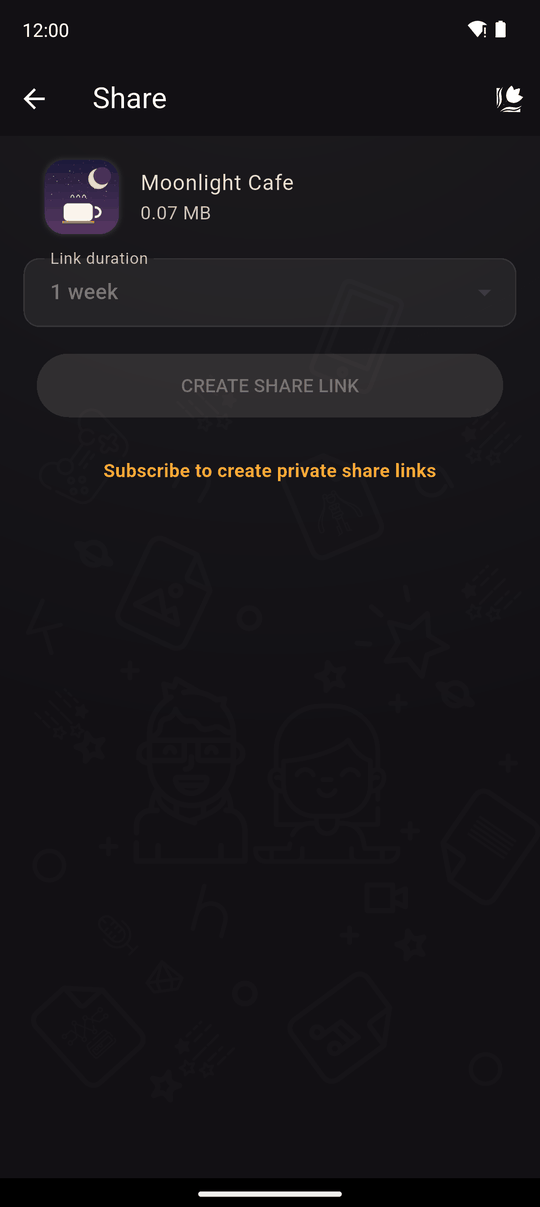
Without Premium the button is disabled and the screen says Subscribe to create private share links. You are also asked to log in, and your novel needs an icon.
Anyone with this link can download and play your novel until it expires. Only send it to people you trust.
What the other person sees
| They open the link on… | What happens |
|---|---|
| A phone or tablet with Kohana | The page offers Open in Kohana. The app shows the novel with who shared this with you, its size and a DOWNLOAD button. It is added to their Library |
| A phone without Kohana | The same page, with a link to get the app |
| A computer | The novel opens in the Web Player in their browser, no install needed |
If the link has expired or was revoked, they see This link has expired or doesn't exist.
Embedding a private novel
On a computer, the novel's Web Player page has the same Share button as a published novel's page, with Copy Link and Embed. That means you can drop an unpublished, privately-shared novel straight into your own website or blog, exactly like an embedded published novel -- see Share and embed. The embed only keeps working while the link itself is valid: if it expires or you revoke it, the embed stops playing too.
Manage your links
Open Settings and tap My Shares. Each link shows the novel, and when it Expires (or Unlimited or Expired). Every row has:
- Copy link
- Revoke: stops the link immediately for everyone (Are you sure you want to revoke the share link…?)
You can view and revoke your links even if your Premium has ended. Only creating new ones needs Premium.
Expiry and unlimited links
- Timed links stop working when the time is up and are cleaned up.
- Unlimited links work only while your subscription is active. If Premium lapses, they stop working, and links unused for a year after that are removed. Renew and they work again, if they have not been removed yet.
Tips
- Pick the shortest duration that suits you. You can always make another link.
- Private links are unlisted and not proactively reviewed, but the Community guidelines still apply. Kohana may disable a link or remove its content if a violation is reported or discovered.
- Someone who downloads the novel keeps their copy even after the link stops working.
- To let everyone find your novel, use Upload for review instead.
Related
Share a package · Premium · Web Player
Last updated: