


Request input
The Request input action asks the reader to type something, such as their name or a password, and stores the answer in a variable so you can use it in the story.
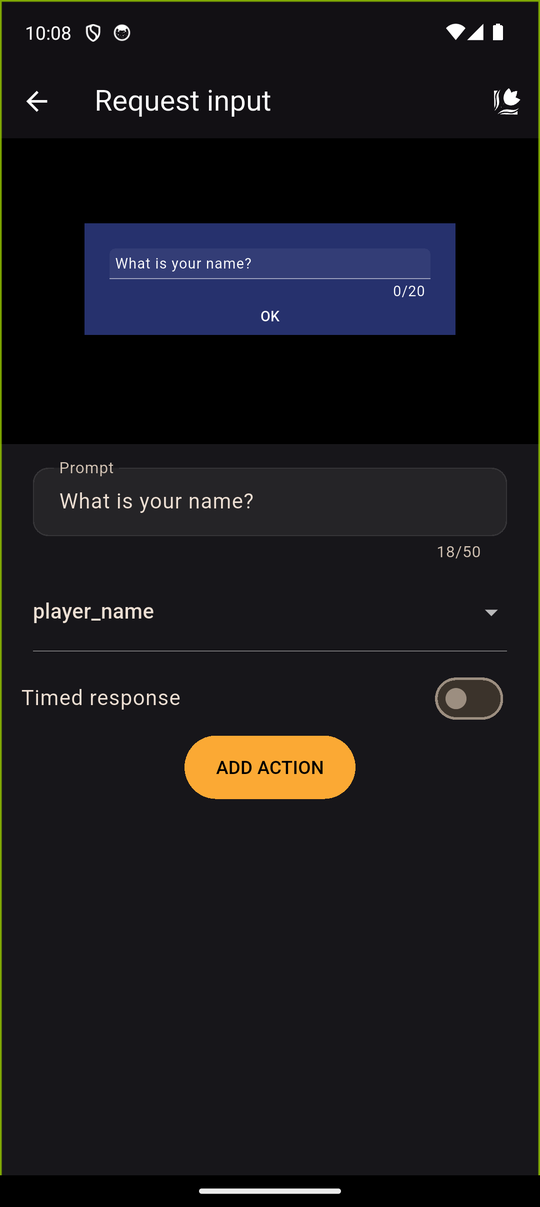
Settings
| Setting | Details |
|---|---|
| Prompt | The question shown to the reader. Up to 50 characters |
| Variable | Where the answer is stored: pick one (Select a variable) or create New variable (Variable name, up to 50 characters) |
| Timed response | Optional. Give the reader 3 to 120 seconds |
| Default value if no response | What is stored if time runs out. Up to 50 characters |
Using the answer
Write the variable's name in square brackets in a Text action, and it is replaced with what the reader typed:
Nice to meet you, [player name]!
You can also use it in a condition, for example to check that the reader typed a specific word. See Showing variables in text.
In the player
A text box with the prompt appears. The reader's answer can be up to 20 characters (10 in Japanese), so it suits names and short words, not sentences. The answer is stored as text in the variable when the reader sends it. If a timer is set and runs out, the default value (or an empty answer, if you left it blank) is stored, and the story continues. There is no visible countdown.
Tips
- Store names in a Text variable. See Variables.
- Add a sensible default, like Player, so a timeout still reads naturally.
- Don't ask for anything sensitive. Answers are stored in the reader's save file on their device.
Related
Variables · Showing variables in text · Conditions
Last updated: