


Choices
The Choices action pauses the story and lets the reader decide. You can add up to 4 choices, and each one can change your story's variables so later scenes react.
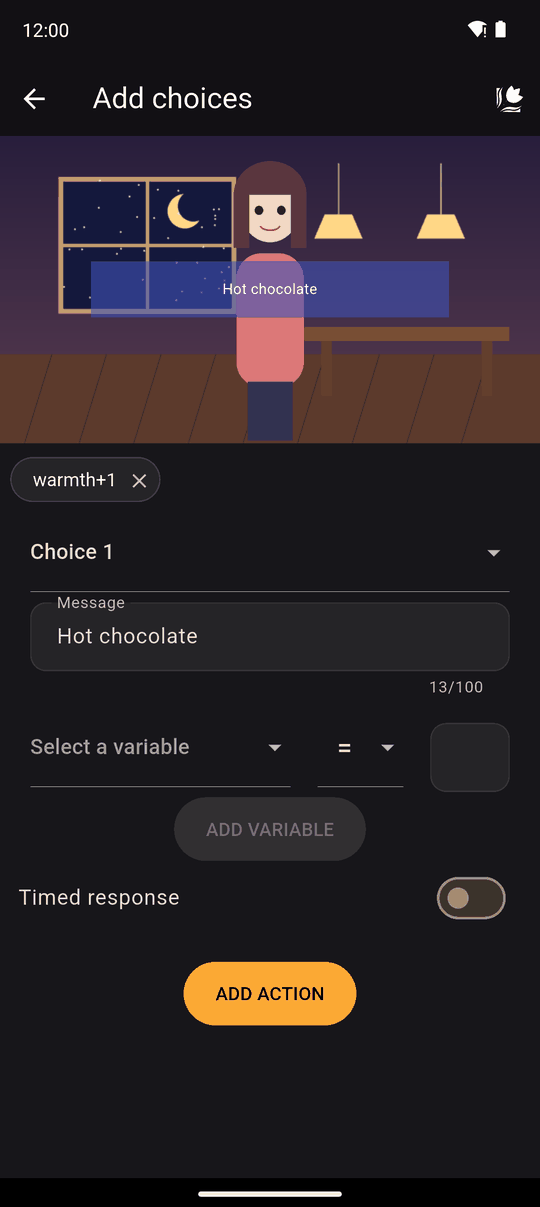
Settings
| Setting | Details |
|---|---|
| Select a choice | Pick which of the four choices you are editing |
| Message | The text on the button. Up to 100 characters |
| Variable changes | What this choice does to your variables when picked. One choice can change several. See Modify variable for the operators |
| Timed response | Optional. Give the reader 3 to 120 seconds to answer |
| Default choice if no response | With a timed response on, the choice picked automatically when time runs out |
Effects and outcomes
Choices do not branch by themselves. The effects are measured with variables, and the outcome is decided with conditions.
A common pattern:
- Choice Help her adds 1 to
kindness; choice Ignore her changes nothing. - A later scene has the condition
kindness >= 1, so only readers who helped see it.
For a hard fork, use Go to as an action inside a condition-guarded folder.
In the player
The choices appear as buttons and the story waits for a tap. With a timed response, the default choice is taken automatically if the time runs out, exactly as if the reader had tapped it, including its variable changes. There is no countdown on screen, so readers are not told about the timer. If you don't pick a default choice, nothing happens when time runs out and the choices stay until the reader picks one.
The reader's saved game remembers the variables, so loading a save keeps their earlier decisions.
Tips
- Make the timer generous. Readers get no visible countdown, and 3 seconds is very short. Use timed responses for a twist ("if you hesitate, she leaves"), not as a default.
- Give every choice something, even a small variable change, so the reader feels their decision mattered.
Related
Variables · Conditions · Interactive areas · Modify variable
Last updated: